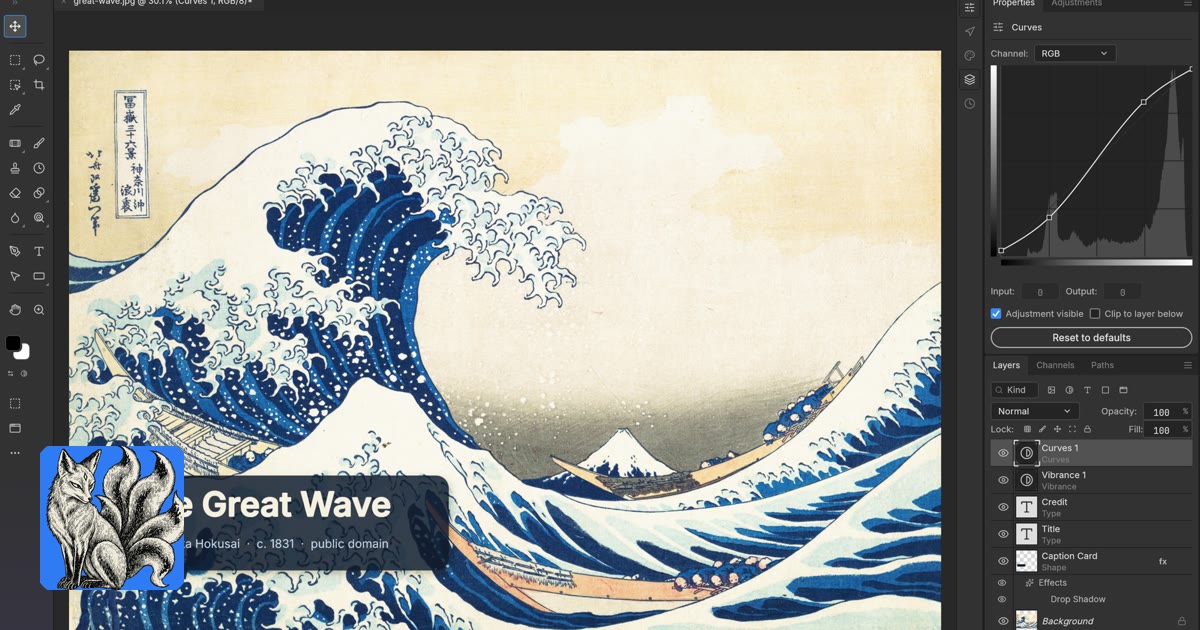
ArtCraft's seven free, open-source Crafting Apps are now listed on NeonRoof: PhotoCraft, VectorCraft, FilmCraft, LightCraft, PdfCraft, EffectCraft, and DesignCraft. They cover image editing, illustration, video, photography, PDFs, motion graphics, and publication layout. Our entries include official Windows installer links, project artwork, screenshots, source repositories, and license information.
The collection drew attention in a post shared by Charly Wargnier on X. The useful story for creators is what these applications offer today. ArtCraft's official lineup describes PhotoCraft and PdfCraft as early alpha and the other five as in development. They are interesting projects to explore, with important testing still ahead for anyone considering production work.
Which Crafting App should you try?
PhotoCraft: layered image editing
PhotoCraft on NeonRoof brings together image layers, masks, brushes, type, and adjustments. Its project also documents PSD support. If your task is editing a picture or assembling layered artwork, this is the relevant starting point. Official PhotoCraft details.
VectorCraft: illustration and scalable artwork
VectorCraft on NeonRoof focuses on paths, shapes, editable effects, and vector output. That makes it the collection's option to explore for illustration and scalable design assets. Check exported files in the tools your collaborators use. Official VectorCraft details.
FilmCraft: video editing
FilmCraft on NeonRoof offers a timeline-centered editing workflow with trimming, effects, keyframes, and color tools. It is the relevant app for assembling footage and experimenting with a short trailer or clip. Test your required media formats before starting a long edit. Official FilmCraft details.
LightCraft: photo organization and RAW development
LightCraft on NeonRoof combines photo-library tools with non-destructive RAW development. Photographers can explore its organization and adjustment workflow while checking compatibility with their own camera files. Official LightCraft details.
PdfCraft: everyday PDF work
PdfCraft on NeonRoof is intended for reading, organizing, combining, splitting, and securing PDFs. It addresses document tasks rather than image creation. Check any edited forms or complex documents in another viewer before sharing them. Official PdfCraft details.
EffectCraft: motion graphics and compositing
EffectCraft on NeonRoof centers on compositions, layers, animation, and visual effects. It is an option for exploring animated titles and other layered sequences. Start with a small render to see how it fits your workflow. Official EffectCraft details.
DesignCraft: publication layout
DesignCraft on NeonRoof targets designed publications with page spreads, threaded text, styles, and swatches. Think guides, zines, or other page-based projects. Verify typography and export results before printing. Official DesignCraft details.
A creative workflow for developers and graphic artists
For a game developer, these tools could support the work around the game: interface artwork, trailer experiments, and downloadable guides. For a graphic artist, the same collection offers separate starting points for raster images, vector illustration, animation, and publication design. Those are suggested uses, not a claim that we have validated a complete production pipeline.
A practical first test is one small deliverable: a layered promotional image, a scalable illustration, a short animated title, or a two-page guide. Check the final export in its destination app, browser, or printer before expanding the project.
This editorial is part of NeonRoof's developer and creator tools coverage. Continue with our free game-development software guide, indie game art and trailer workflow, and prototype-to-players toolchain.
Browse tools by task in Graphics & Design, Photo & Image Editing, and Video Editing, or follow the Developers news section.
What has NeonRoof checked?
On October 8, 2026, we checked the official repositories, published release metadata, Windows installer URLs, upstream checksum records, and artwork links. All seven repositories identify an Apache 2.0 license. The NeonRoof download buttons point to the original project releases on GitHub.
This is a catalog and source check, not an independent feature benchmark or a malware certification. We have not tested complete production workflows in these applications. Keep backups and use copies of important projects when trying early software.
Questions creators are asking
Are the seven Crafting Apps free?
Yes. ArtCraft describes this collection as free and open source. This article concerns the seven Crafting Apps; it does not describe the pricing of ArtCraft's separate AI services.
Do they replace every Adobe feature?
We have not established feature parity. The apps address similar creative tasks, but their early development status matters. Try the specific import, editing, and export steps you need before making a switch.
Which operating systems are supported?
ArtCraft offers desktop downloads for Windows, macOS, and Linux. NeonRoof links the Windows x64 installers, with the official product pages providing other builds. Browser build availability should not be confused with a NeonRoof-hosted browser app.
Are these made by NeonRoof or Adobe?
No. They are ArtCraft projects. NeonRoof provides independent catalog listings and official links. Adobe product names in comparisons identify familiar workflows and do not imply affiliation or endorsement.
Where can I download them?
Visit the linked NeonRoof software pages above or the official Crafting Apps directory. Use the project release pages to review current builds and their release notes.
Editorial note: descriptions are based on official project documentation and release information checked October 8, 2026. The banner and application screenshots are credited to ArtCraft. Development status and versions may change.
No comments yet. Start the conversation with a useful, on-topic response.