Join players and independent developers in the NeonRoof Discord community to discuss these games, publishing, and practical game-development work.
What is the best free game-development software for an indie developer?
The best free indie game-development stack is the smallest set of tools that can take your idea from a playable build to a clear store page. A practical starting stack is Godot for the engine, Blender for 3D assets and animation, GIMP for 2D art and store images, and HandBrake for preparing video. Choose tools that fit the game, document your workflow, and spend the saved budget on testing and reaching players.
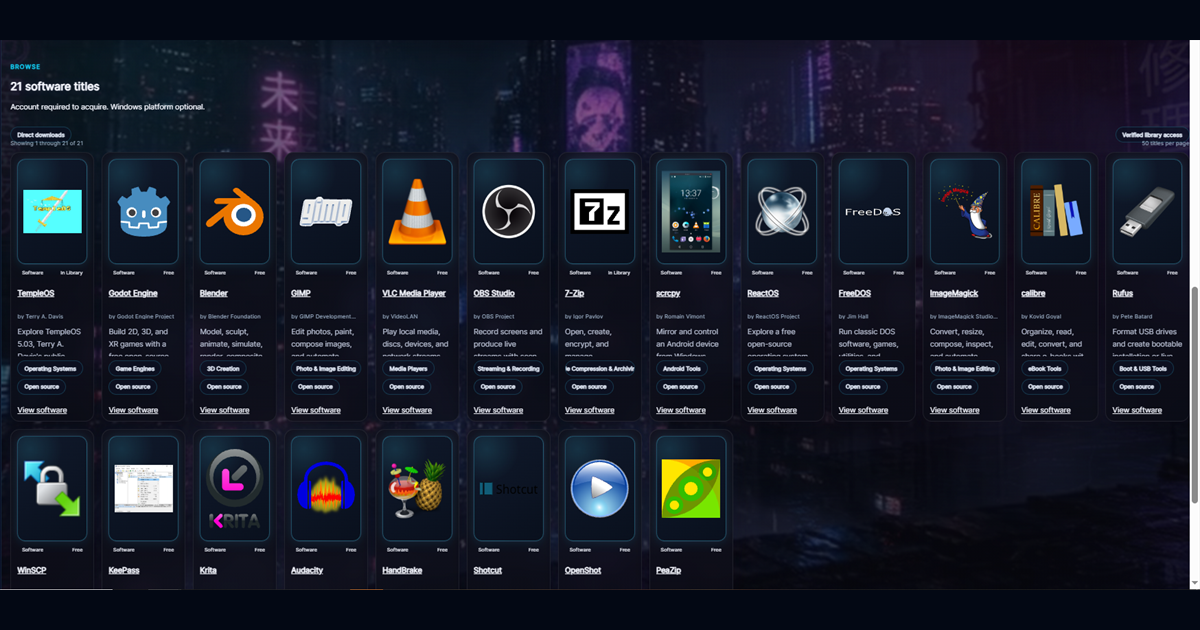
NeonRoof now groups these applications in its Game Development software collection, while keeping every program in its original category. This makes it easier to find a complete production workflow without pretending that one tool does everything.
Godot for building and exporting the game
Godot Engine on NeonRoof is a free, open-source engine for 2D and 3D projects. Its scene system, scripting options, editor, animation tools, user-interface controls, and export workflow make it a practical choice for solo developers and small studios. The official Godot documentation remains the primary technical reference.
Godot is especially useful when a team wants an engine that can be inspected, extended, and used without a per-seat subscription. That does not make it the automatic choice for every project. A developer should still test the target platform, rendering needs, middleware, accessibility requirements, controller support, and build size before committing.
If Godot fits your game, the NeonRoof guide for Godot developers connects engine-specific preparation to the normal publishing path.
Blender for models, animation, rendering, and video
Blender on NeonRoof can cover modeling, sculpting, rigging, animation, rendering, compositing, and portions of video production. That range matters to an indie studio because one consistent asset pipeline is easier to maintain than several disconnected subscriptions. Blender is developed as free and open-source software, with official information available from the Blender project.
For a game workflow, decide on scale, coordinate conventions, naming rules, texture paths, polygon budgets, and export settings before the asset library grows. A beautiful model that arrives in the engine with the wrong scale, broken materials, or an unclear license still creates production debt.
GIMP for textures, interface art, and storefront images
GIMP on NeonRoof is useful for textures, interface elements, image cleanup, transparent exports, screenshots, cover compositions, and social graphics. The official GIMP website provides downloads and documentation.
Store art is not an afterthought. Players often meet the cover, screenshot, or social preview before they read a description. Keep the title readable at small sizes, show real gameplay, avoid tiny interface text, and do not stretch one image into every aspect ratio. Save editable source files so updates do not require rebuilding the art from scratch.
HandBrake for smaller, cleaner trailer files
HandBrake on NeonRoof is a video transcoder, not a full nonlinear editor. It is useful near the end of the pipeline when a trailer, gameplay capture, or press video needs a more practical file size and compatible format. The HandBrake documentation explains formats, presets, quality controls, and hardware encoding.
Keep a high-quality master before compression. Check motion, small text, dark scenes, audio synchronization, and image quality after encoding. A small file is not helpful if the gameplay becomes difficult to see.
What other free tools belong in an indie workflow?
The exact stack depends on the project. OBS Studio can capture gameplay and developer commentary. Audacity can clean dialogue and recorded effects. Krita is useful for painting, concept art, and frame-by-frame animation. ImageMagick can automate repeatable image conversions. Git and a remote backup can protect source history. None of these replaces careful backups, license records, testing, or human review.
The NeonRoof Software Store keeps software separate from games while connecting useful creator tools to the wider developer ecosystem.
How does software become a game players can discover?
Tools produce the build and the media. Publishing gives those materials a durable public home. NeonRoof lets an approved developer create a game page with cover art, banner art, screenshots, trailer, description, system requirements, support links, studio links, price, and delivery details. The same catalog record can reach the website and the Windows platform.
NeonRoof is not asking developers to erase Steam, itch.io, their own website, or a community that already works. It provides another searchable storefront, a permanent developer profile, editorial opportunities, community connections, and an assisted publishing path when the upload process becomes a blocker.
Read where to publish an indie game in 2026, then use the complete 90-day launch checklist to organize the release.
Frequently asked questions
Can an indie developer make a game with only free software?
Yes. Many games can be built, tested, packaged, and marketed with free or open-source tools. The real costs may still include time, hardware, contractors, music, fonts, hosting, certification, legal work, and promotion. Track every asset license even when the purchase price is zero.
Does using free software make a game look unprofessional?
No. Professional results come from a controlled workflow, clear art direction, testing, performance work, accessibility, and consistent presentation. Tool price does not replace skill, and a paid tool does not guarantee quality.
Where can I publish an indie PC game?
Use the channels that fit your audience. NeonRoof is designed to be an additional place to publish, sell, and grow an indie PC game, with free assisted publishing available when you want help assembling the listing.
A practical next step for indie developers
Godot, Blender, GIMP and HandBrake produce the game and its media; release planning connects that work to a useful public store page. Validate the finished description, image shapes and launch schedule before publishing.
Check your description, artwork dimensions, sales assumptions and release timing with the free Indie Dev Tools hub. These checks help you prepare a clearer launch; they do not predict search rankings or guarantee sales.
Continue the indie developer series
- How to build an indie game art and trailer pipeline with free software
- The complete indie game toolchain from prototype to players
- How to market an indie game organically in 2026
- How to make an indie game press kit journalists can use
When the build is ready, start NeonRoof developer onboarding, submit the game for NeonRoof News, or use free assisted publishing.
Related practical guides for indie developers
For a Godot project, follow this workflow to export, test and deliver a complete Windows build: How to Export and Publish a Godot Game for Windows.
For specific choices in level design and game art, read Free Game Development Tools for 2D Maps, FPS Levels, and Game Art.
For visual novels, the Ren'Py workflow is explained in Ren'Py for Indie Game Developers: Free Visual Novel Engine and Toolchain.
More free tools for developers and graphic artists
Explore seven free ArtCraft creative apps on NeonRoof for image editing, vector illustration, video, photography, PDFs, motion graphics, and page layout. The editorial explains their early development status and links to official releases.
No comments yet. Start the conversation with a useful, on-topic response.